

LMS/Reservation Support
 This page was created to help you with your questions about your Reservations and our Learning Management System (LMS). Below, we have answers to frequently asked questions and a tutorial video on how to use the LMS. If you do not find the answer to your questions below, please get in touch with us at:
LMS Support:
[email protected]
Reservation Support:
[email protected]
For a step-by-step tutorial on how to book a program, click here.
LMS Tutorial Video
Benefits of Using the LMS Materials
- Multiple opportunities for students to access and understand program content
- eLearning activities completed prior to our visit prepare students with the background knowledge needed to be more fully engaged during the classroom program.
- Post-activities allow students to apply what they have learned.
- Teachers can access assessment reports to gauge student learning growth from pre- to post-test.
- Schools report students feeling more comfortable with attending the in-school program
Communication Timeline
| Communication from Candor Health Education | When it is sent and who sends it | To whom |
|---|---|---|
| 1. Email with program confirmation details, Parent Overview Link and password | • After the program is reserved and entered in the reservation system with date, time, number of students and teacher emails. • From Reservation Team (Karime or Ashley) [email protected] [email protected] [email protected] |
School main contact or District main contact |
| 2. Invoice Payment | • Within 15 school days of scheduling your program(s) • From QuickBooks |
Main contact and/or accounts payable or other staff (if requested) |
| 3. Email with the following info: • Direction on how to log in to the LMS • Student logins and passwords to view the pre and post program materials • Parent letters for school to distribute (optional and available in English and Spanish) |
• 2 weeks before the program • From the LMS Team (Sherry or Liz) [email protected] [email protected] |
Teachers and main contact (if requested) |
| 4. Email to classroom teachers on how to prepare their space, technology, and time for their upcoming programs • If virtual, this email includes the links to the program(s) |
• Within 1 week prior to the program date(s) • From [email protected] |
Classroom teachers |
| 5. Email with post visit information and link to evaluation surveys | • Within 2-3 days after program • From the LMS Team (Sherry or Liz) [email protected] [email protected] |
Teachers and main contact |
FAQs
Learning Management System Questions:
For teachers: Click “Forgot Password” on main screen
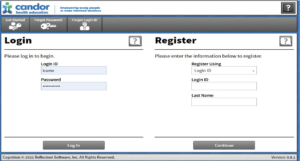
Next, Click Administration → Users → Type in login ID or first and last name → click on person → double check “Contact” has correct email → Security → Generate Reset key

If you have additional issues with your password reset or the instructions above do not work, please email our LMS Coordinator at [email protected] and you will receive a response to your email.
Please see the tabs at the bottom of the spreadsheet. The tabs are labeled “Instructions”, “User List” and “Print Slips”. Teachers can only type in User List, which then carries over to the Print Slips tab. Those print slips can be printed and distributed to students.
Please have students complete the materials in the order that they appear: pretest, e-learning, [educator visit], followed by post-activities and then the posttest. We now have collections where it is separated as “Do Before” and “Do After” in the LMS. This is the recommended way. If you click on the Development Plan, the recommended order is pre-test, eLearning (then educator visit) and then post-activities and post-test.
It is about 30 minutes depending on the student’s ability to move through the module.
You have access to the LMS components (pre- and post- work), for 2 weeks before and 2 weeks after the presentation. For Online Interactive programs, you will have access to all components for one month from the start date of the program.
You will receive information approximately 2 weeks before the scheduled date. There may be some exceptions upon request.
Our prework/ LMS items run best on the Chrome browser. Some browsers will not open it or play it correctly like Firefox or Apple. If it still isn’t working on Chrome, gather a username/login ID that isn’t working, and we will troubleshoot. Please email our LMS Coordinator, at [email protected] or call our office at 630-325-1900 ext. 240.
Yes, we can allow an additional 5-10 but anything over will need approval. Please email our LMS Coordinator at [email protected] for assistance.
Yes, we would need their email address and how many students they have. Please email our LMS Coordinator at [email protected] for assistance.
Unfortunately, we do not have recorded presentations if someone was absent. We highly recommend reviewing the electronic booklets that are included with the programs and linked in the parent letters. For Substance Abuse Prevention (SAP) programs, we highly recommend the Drug Education portal on our website.
To help students get the most out of the live virtual delivery model, it is strongly encouraged that students join the sessions using their own device whenever possible. Having students join individually provides them with the ability to answer poll questions, complete skill-building activities and submit questions to the educator in the chat. If using Zoom, students can ask their questions privately to our educators to help create an even more comfortable atmosphere.
Online Interactive programs are designed for students to complete the components individually. Students are asked to respond and answer questions throughout the modules. If teachers would prefer to complete the modules together, they can, but the teacher would have to determine collective responses.
Either is acceptable. We recommend before so parents know what is going to be talked about. Some teachers send it with their opt in/out form.
Teachers have access to this via the Development Plan in the LMS. For parents, permission must be given by our Director of Education to send it to the parents. Please email [email protected] to inquire.
LMS materials are available in Spanish for all Sex Education & Substance Use Prevention programs. To request logins for LMS content in Spanish, please email [email protected] with the number of Spanish-speaking students.
Reservation Questions:
To reschedule or cancel your program, we must be notified at least 15 school days prior to your scheduled program. Please email [email protected] or call our office at 630-325-1900 for assistance. Please note that if a 15‐day notification is not received, you will be assessed a penalty fee of 50% of the cost of your scheduled program. Please call our office if you must cancel on the day of your scheduled program due to school closings because of inclement weather.
- On the day of the presentation (if in person) you can expect your Educator to get there 15 to 30 minutes before the program to prepare for the presentation, please be sure we have the ability to project in the space
- Please have your students seated in chairs at desks/tables
- School staff must be present for the entire program session
- Writing utensils are required for the following programs: Puberty I and II, Navigating Middle School Years, and SAP: Foundations
- Students will need the ability to break into 5 stations within the room for the SAP: Foundations program
- The presenter will then present the material and answer student questions
- Virtual Programs: please be sure to have students log on 5-10 minutes prior to start time to make sure everyone has access to the link
If you would like to change the delivery method of your programs from in-person to virtual or vice versa, please call our office as soon as possible ahead of your scheduled program day at 630-325-1900 and a member of our reservation team will assist you.
Yes, you can schedule for the next year! Please email [email protected] with your school name, programs requested, and preferred dates. While we much appreciate schools scheduling in advance, please be sure to notify us as soon as possible if reservations must be adjusted.
You have ten school days prior to your scheduled program to let us know if your attendance numbers change. A difference of plus or minus five students, or 10% of the total number of students attending, whichever is greater, will be allowed on the day of the visit and will not change the confirmed fee. No refunds. Please email [email protected] for assistance.
If you would like to change the virtual platform of your programs, please contact us as soon as possible, in advance of your scheduled program date, by calling our office at 630-325-1900 and a member of our reservation team will assist you.
All programs are 90 minutes in length. Please note the following exceptions: Puberty I in a mixed gender setting (120 minutes), programs for students with special needs (60 minutes), and Vaping (45 minutes).
- For In-Person programs: our Educators have Dell computers and need a way to project whether it is HDMI, VGA or wireless connect that is not Apple air play. If the projector does not have audio capabilities, please have speakers available.
- For Virtual programs: we use Zoom, Google Meets, and Microsoft Teams, though Zoom is our default. Please alert us immediately if your school utilizes Chromebook or is categorized as a “Google” school, if you have not already, so we can share the correct links. To help students get the most out of the live virtual delivery model, we strongly encourage students to join the sessions using their own device whenever possible.
To confirm your presentation date and time, please email our reservation team by emailing [email protected].
We can provide schools with the following upon request:
- Sex education student e-booklets in both English and Spanish
- Parent letters and parent overview videos in both English and Spanish
- On screen Subtitles for many languages during our programs
If you have further questions or need additional assistance, please email [email protected]